아두이노를 사용하면서 스위치(버튼)을 제어할때 자주 사용하는 코드를 정리.
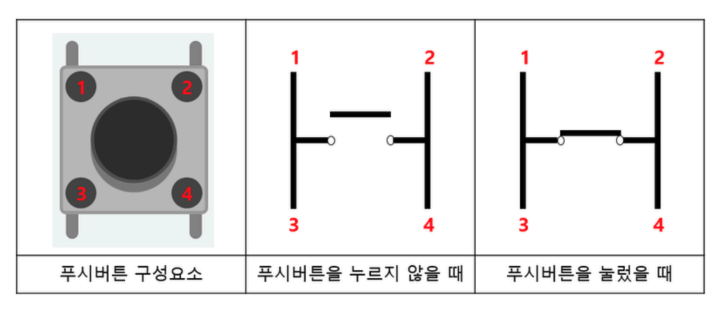
스위치 회로도
라이브러리
- SwitchButton.h
#ifndef SWITCH_BUTTON_H
#define SWITCH_BUTTON_H

#include <Arduino.h>

// 스위치 버튼 클래스 (debounce 포함)
class SwitchButton {
private:
  byte pin;
  unsigned long debounceDelay;
  bool lastState;
  bool currentState;
  unsigned long lastDebounceTime;

public:
  // 생성자: 핀 번호와 debounce 지연 시간 설정 (기본값: 50ms)
  SwitchButton(byte pin, unsigned long debounceDelay = 50);

  // 초기화: 핀 모드를 INPUT_PULLUP으로 설정
  void init();

  // 버튼 상태 체크: 눌림이 감지되면 true 반환
  // loop()에서 반복적으로 호출해야 함
  bool check();

  // 버튼이 눌렸는지 확인 (한 번만 true 반환)
  bool isPressed();

  // 현재 버튼 상태 반환
  bool getState();
};

#endif
- SwitchButton.cpp
#include "SwitchButton.h"

// 생성자: 핀 번호와 debounce 지연 시간 설정
SwitchButton::SwitchButton(byte pin, unsigned long debounceDelay) {
  this->pin = pin;
  this->debounceDelay = debounceDelay;
  this->lastState = LOW;
  this->currentState = HIGH;
  this->lastDebounceTime = 0;
}

// 초기화: 핀 모드를 INPUT_PULLUP으로 설정하고 실제 상태로 초기화
void SwitchButton::init() {
  pinMode(pin, INPUT_PULLUP);
  // 실제 핀 상태를 읽어서 초기화 (버튼이 눌리지 않은 상태로 시작)
  int reading = digitalRead(pin);
  this->lastState = reading;
  this->currentState = reading;
  this->lastDebounceTime = millis(); // debounce 타이머를 현재 시간으로 설정
}

// 버튼 상태 체크: 눌림이 감지되면 true 반환
bool SwitchButton::check() {
  int reading = digitalRead(pin);

  // 초기화되지 않은 경우 (lastDebounceTime이 0이면) 초기화
  if (lastDebounceTime == 0) {
    lastState = reading;
    currentState = reading;
    lastDebounceTime = millis();
    return false;  // 초기화 중이므로 버튼이 눌리지 않은 것으로 처리
  }

  // 상태가 변경되면 debounce 타이머 리셋
  if (reading != lastState) {
    lastDebounceTime = millis();
  }

  // debounce 시간이 지났는지 확인
  if ((millis() - lastDebounceTime) > debounceDelay) {
    // 안정된 상태가 변경되었는지 확인
    if (reading != currentState) {
      currentState = reading;
      // 버튼이 눌렸을 때 (LOW = 눌림, HIGH = 안 눌림, INPUT_PULLUP 사용 시)
      if (currentState == LOW) {
        lastState = reading;
        return true;  // 버튼이 눌림
      }
    }
  }

  lastState = reading;
  return false;  // 버튼이 눌리지 않음
}

// 버튼이 눌렸는지 확인 (한 번만 true 반환)
bool SwitchButton::isPressed() {
  return check();
}

// 현재 버튼 상태 반환
bool SwitchButton::getState() {
  return currentState;
}
- 사용법
#include "SwitchButton.h"

// 스위치 버튼 객체 생성
SwitchButton switchButton(SWITCH_PIN, 50);  // 핀 번호, debounce delay (ms)

void setup() {
  // 스위치 버튼 초기화
  switchButton.init();
}

void loop() {
  if (switchButton.check()) {
    // do something...
  }
}